Blog · Application
Pump discharge pressure that does not chatter
One clean “pressure OK” signal for the PLC, with a set point and a reset point so the output does not flicker on pump ripple.

The problem
A pump with a running motor is not a pump that delivers: discharge pressure cannot confirm flow or delivery. A closed discharge valve may leave the pump pressurised while flow is zero. This proposed low-pressure signal uses hysteresis to avoid output chatter near the working pressure; it is not dry-run or blocked-discharge protection. Pump-specific operating limits and protection require separate design and commissioning, which this simulated station has not performed.
The station
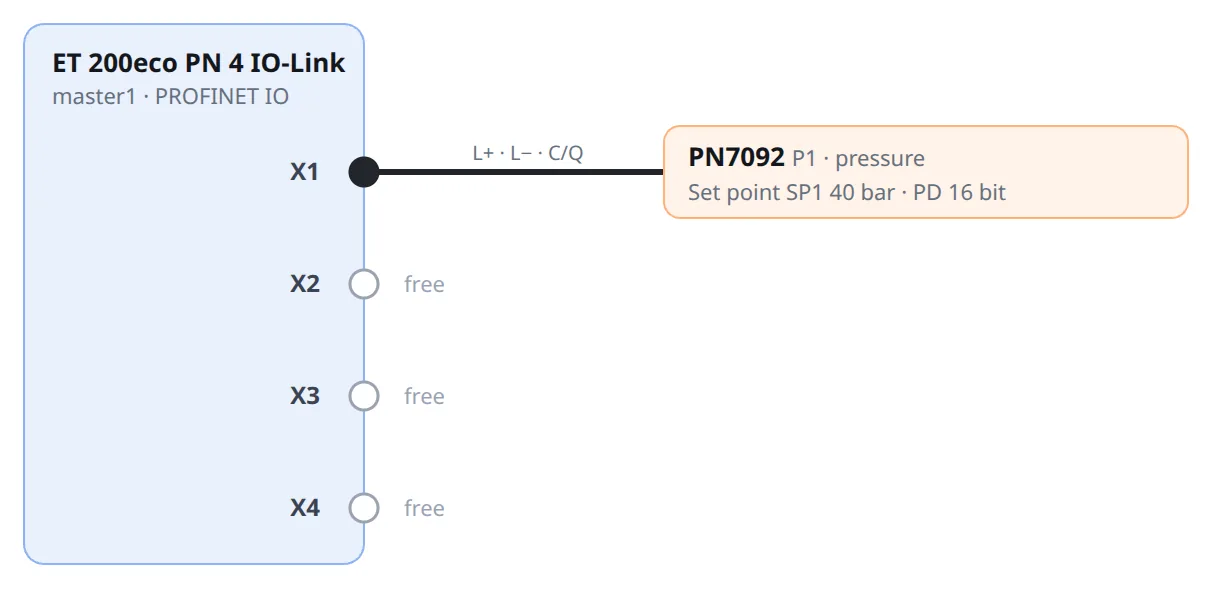
- Sensor ifm PN7092, 0 to 100 bar, liquids, G 1/4, port class A
- Master Siemens SIMATIC ET 200eco PN 4 IO-Link (6ES7148-6JA00-0AB0)
- Port X1, 5.7 m route, 10 m cable. Siemens allows 20 m unshielded for IO-Link
The settings that matter
| Setting | Value | Why | Datasheet / IODD |
|---|---|---|---|
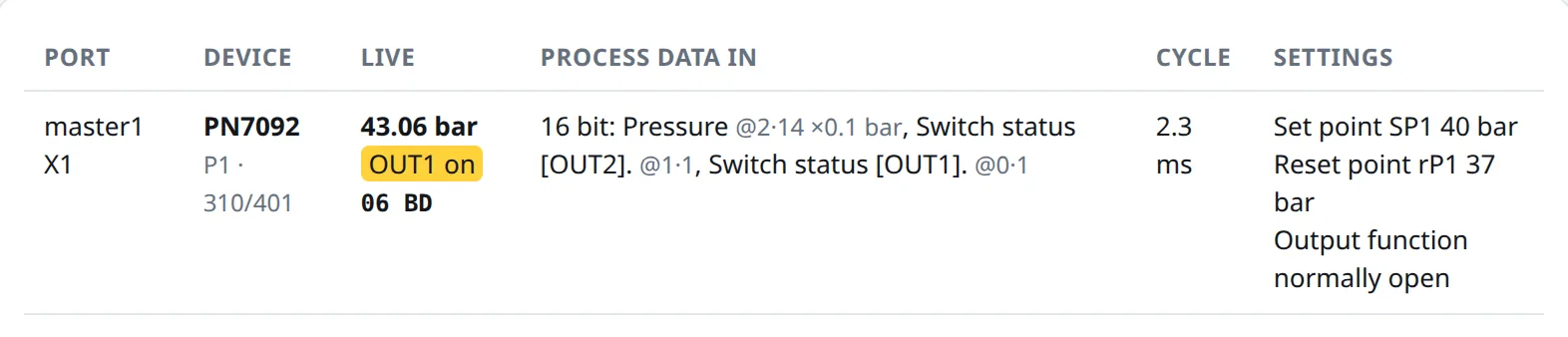
| Set point SP1 | 40 bar | “Pressure OK” from here up. Our pump runs a little under 50 bar; use your pump curve | SP 1 to 100 bar, steps of 0.5 bar |
| Reset point rP1 | 37 bar | Drops only below this. The 3 bar gap must be larger than the ripple | rP 0.5 to 99.5 bar, at least 0.5 bar below SP |
| Output | normally open | 24 V while pressure is OK | NO/NC parameterisable |
The studio checks the ranges and that rP is at least 0.5 bar below SP. 120 bar is refused: the PN7092 stops at 100. Switch-on and switch-off delays (0 to 50 s) are left at the factory value; the studio does not set them yet.
Run it
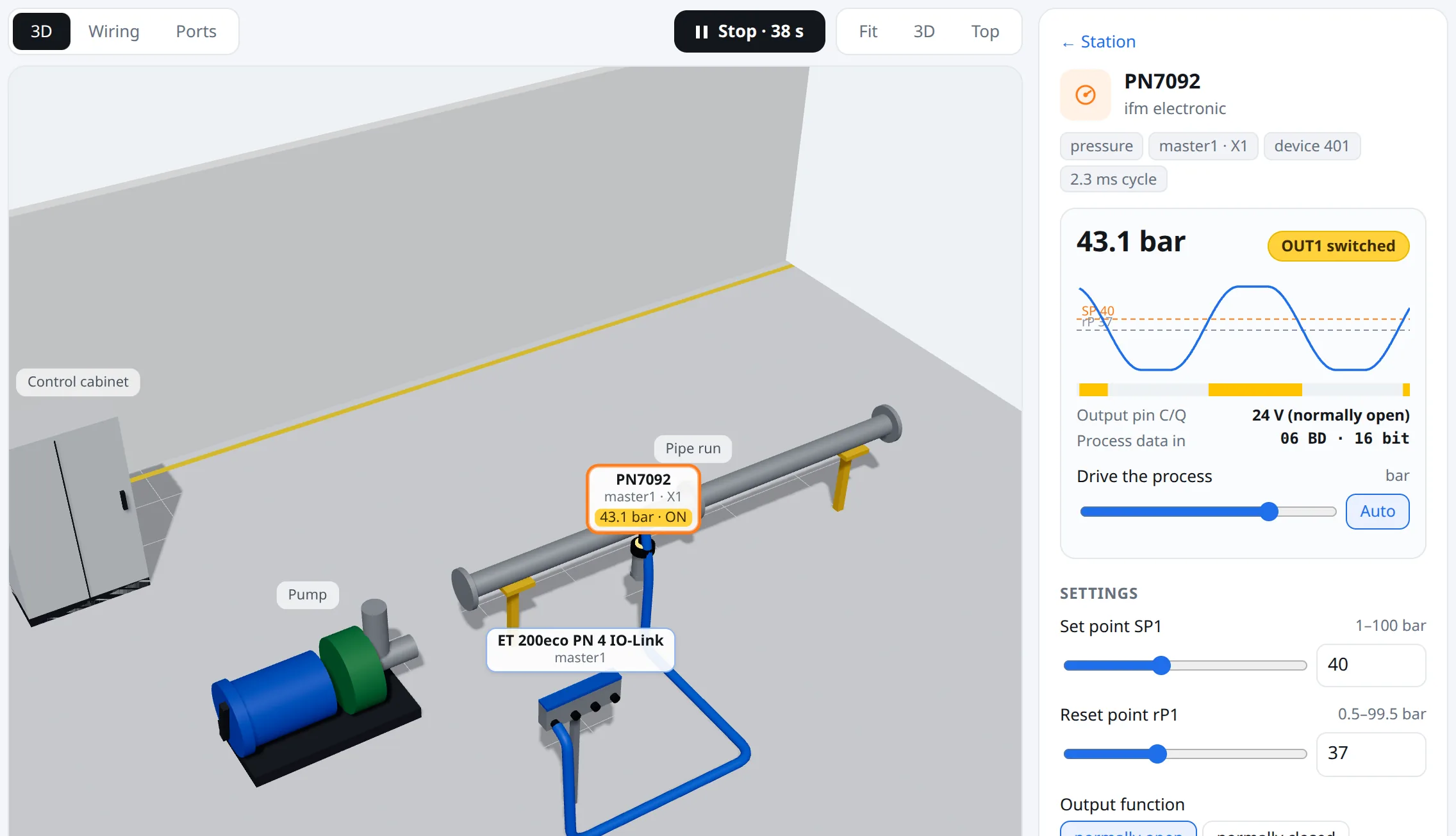
06 BD: 0x06BD shifted right by two is 431, that is 43.1 bar, and bit 0 is OUT1. The trace shows the output switching at 40 and dropping at 37.What you get
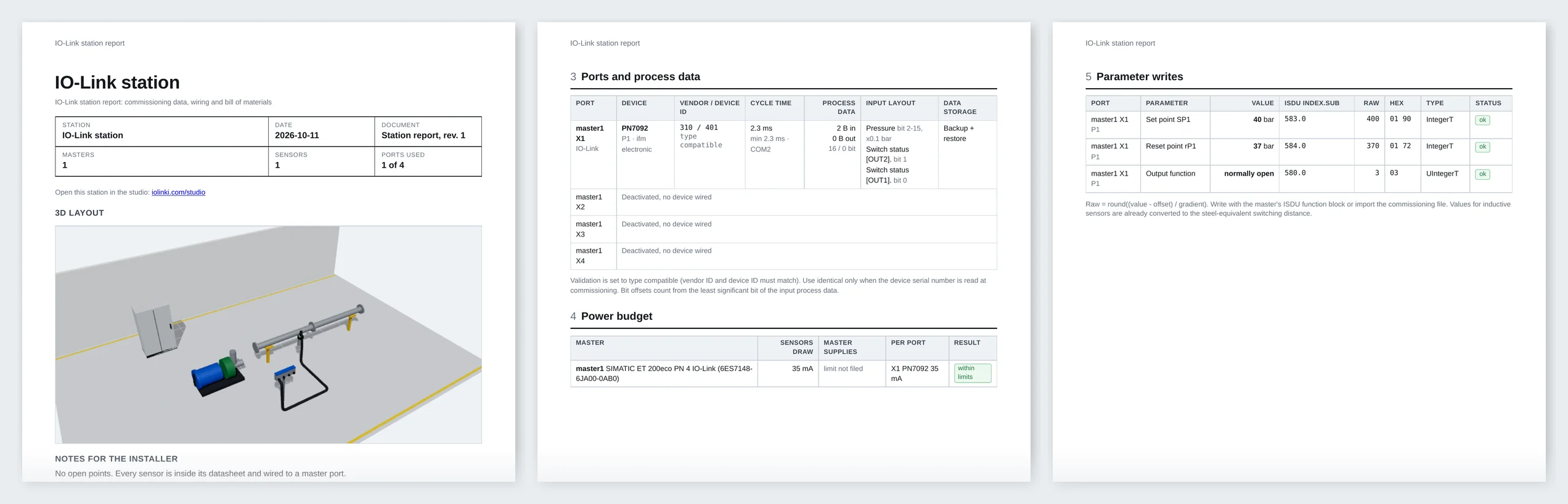
The screenshots show the earlier example. The JSON, CSV and current HTML report below use the current Studio data. They are proposed settings, not a record of physical commissioning.
The commissioning file has every port: validation IDs, cycle time, data storage, and each parameter as ISDU index, subindex and raw value. This is port X1 from the real file, trimmed to the fields that matter:
{
  "port": 1,
  "mode": "iolink",
  "tag": "P1",
  "device": {
    "part": "PN7092",
    "vendor": "ifm electronic",
    "vendor_id": 310,
    "device_id": 401,
    "iodd_file": "ifm-000191_V104326821-20140909-IODD1.1.xml",
    "bitrate": "COM2",
    "validation": {
      "recommended": "type_compatible",
      "vendor_id": 310,
      "device_id": 401,
      "alternatives": [
        "none",
        "type_compatible",
        "identical"
      ],
      "serial_number": null
    },
    "data_storage": {
      "recommended": "backup_restore",
      "note": "Parameters are kept in the master so a replacement device is loaded automatically. Needs a device that supports data storage; check the IODD."
    },
    "cycle_time_ms": {
      "device_min": 2.3,
      "recommended": 2.3
    },
    "process_data": {
      "in_bits": 16,
      "in_bytes": 2,
      "out_bits": 0,
      "out_bytes": 0,
      "in_layout": [
        {
          "name": "Pressure",
          "bit_offset": 2,
          "bits": 14,
          "gradient": 0.1,
          "unit": "bar"
        },
        {
          "name": "Switch status [OUT2].",
          "bit_offset": 1,
          "bits": 1,
          "gradient": null,
          "unit": null
        },
        {
          "name": "Switch status [OUT1].",
          "bit_offset": 0,
          "bits": 1,
          "gradient": null,
          "unit": null
        }
      ]
    },
    "parameters": [
      {
        "key": "sp1",
        "name": "Set point SP1",
        "kind": "setting",
        "unit": "bar",
        "value": 40,
        "entered": 40,
        "note": null,
        "index": 583,
        "subindex": 0,
        "datatype": "IntegerT",
        "bit_length": 16,
        "raw": 400,
        "raw_hex": "01 90",
        "clamped": false,
        "status": "ok"
      },
      {
        "key": "rp1",
        "name": "Reset point rP1",
        "kind": "setting",
        "unit": "bar",
        "value": 37,
        "entered": 37,
        "note": null,
        "index": 584,
        "subindex": 0,
        "datatype": "IntegerT",
        "bit_length": 16,
        "raw": 370,
        "raw_hex": "01 72",
        "clamped": false,
        "status": "ok"
      },
      {
        "key": "output",
        "name": "Output function",
        "kind": "option",
        "unit": "",
        "value": "normally open",
        "entered": null,
        "note": null,
        "index": 580,
        "subindex": 0,
        "datatype": "UIntegerT",
        "bit_length": 8,
        "raw": 3,
        "raw_hex": "03",
        "clamped": false,
        "status": "ok"
      }
    ]
  }
}
Download: commissioning file (JSON) · CSV · current station report (HTML)
Buy and install. One button in the studio sends the station to us. We reply with a price and an install date, buy the parts, mount and wire them, and write the settings on site. No payment is taken in the studio.
Open this station in the studio
The same station comes out of ChatGPT with the iolinki connector (https://mcp.iolinki.com/mcp, setup on the MCP page): describe the job and it builds, checks and shows the station in the chat.