Blog · Application
Box detection on a conveyor
Count the boxes, ignore the guard rail behind them, and get the distance to every box over IO-Link.

The problem
Counting cartons requires controlling what enters the beam. Distance background suppression can ignore a rail beyond the set distance, but it does not identify object type: a person or another object closer to the sensor can still trigger the output. Position the sensor and protect the sensing path so only cartons cross it; verify the real carton and background response on site.
The station
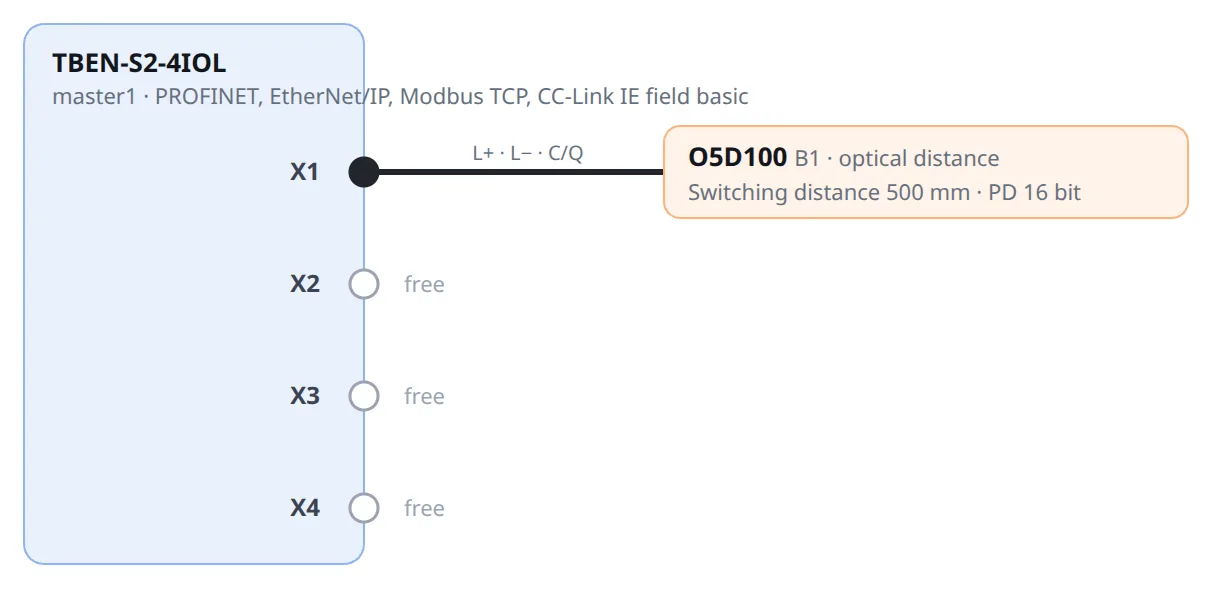
- Sensor ifm O5D100, laser distance with background suppression, class 1 laser, port class A
- Master Turck TBEN-S2-4IOL, 4 ports, PROFINET, EtherNet/IP or Modbus TCP
- Port X1, 4.7 m route, 10 m cable. The C0 to C3 supply is not short-circuit proof (4 A per group), so protect V2 in the cabinet

The settings that matter
| Setting | Value | Why | Datasheet / IODD |
|---|---|---|---|
| Switching distance | 500 mm (raw 50 cm) | Any object within 500 mm triggers; the rail beyond is ignored | Measuring range 0.03 to 2 m on 90 % white; IODD SP1 5 to 200 cm |
| Output | normally open | 24 V while a box is in front | Two complementary outputs |
| Box gap | check on site | Gap ÷ belt speed must be longer than one switching cycle | Switching frequency 15 Hz |
The 2 m range is for white paper at 90 % remission. Brown cardboard reflects less, so check the switch point with your real boxes. Extraneous light on the object must stay under 8 klx.
Run it
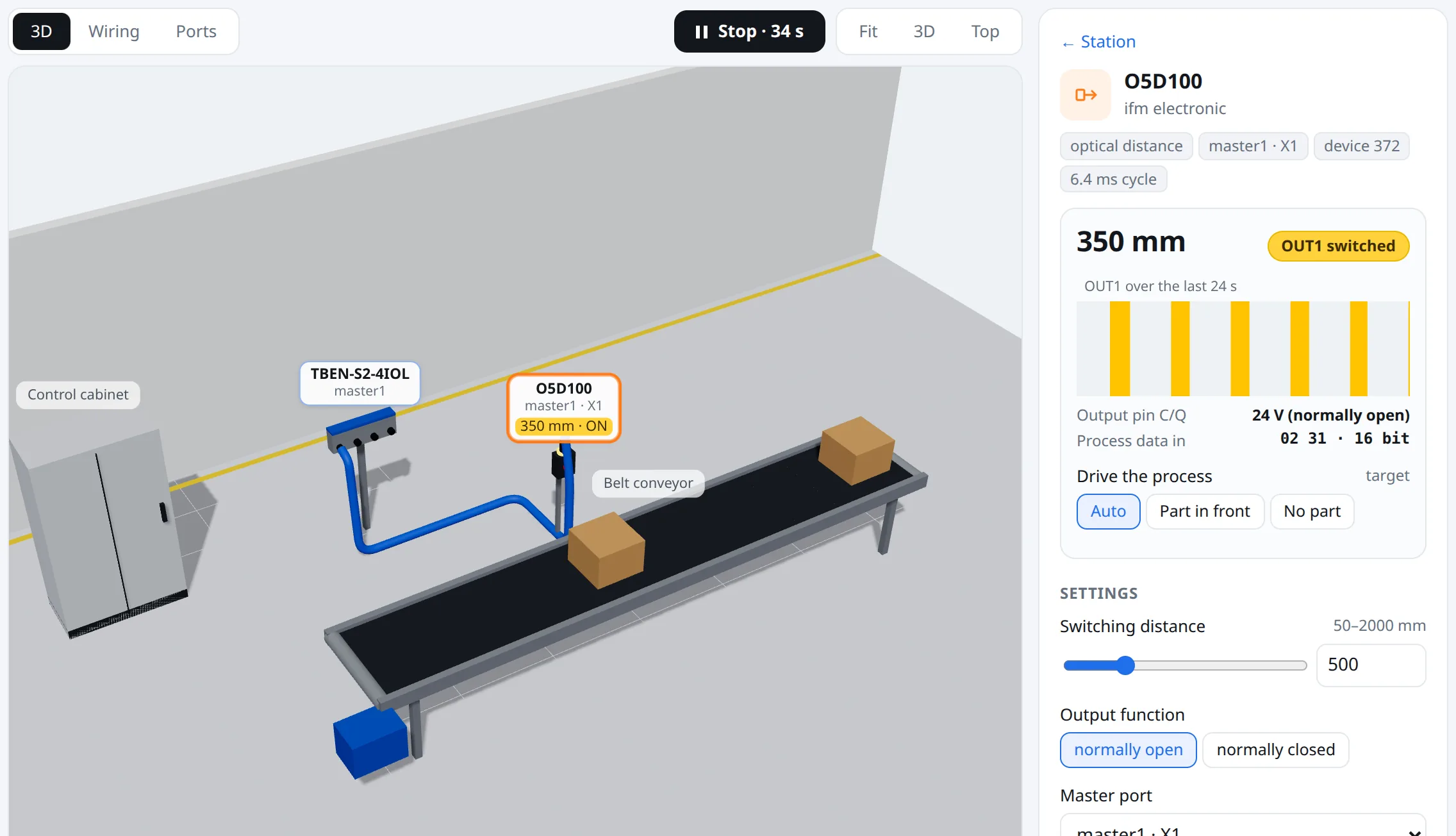
02 31: 0x231 shifted right by four is 35 cm, and bit 0 is OUT1.What you get
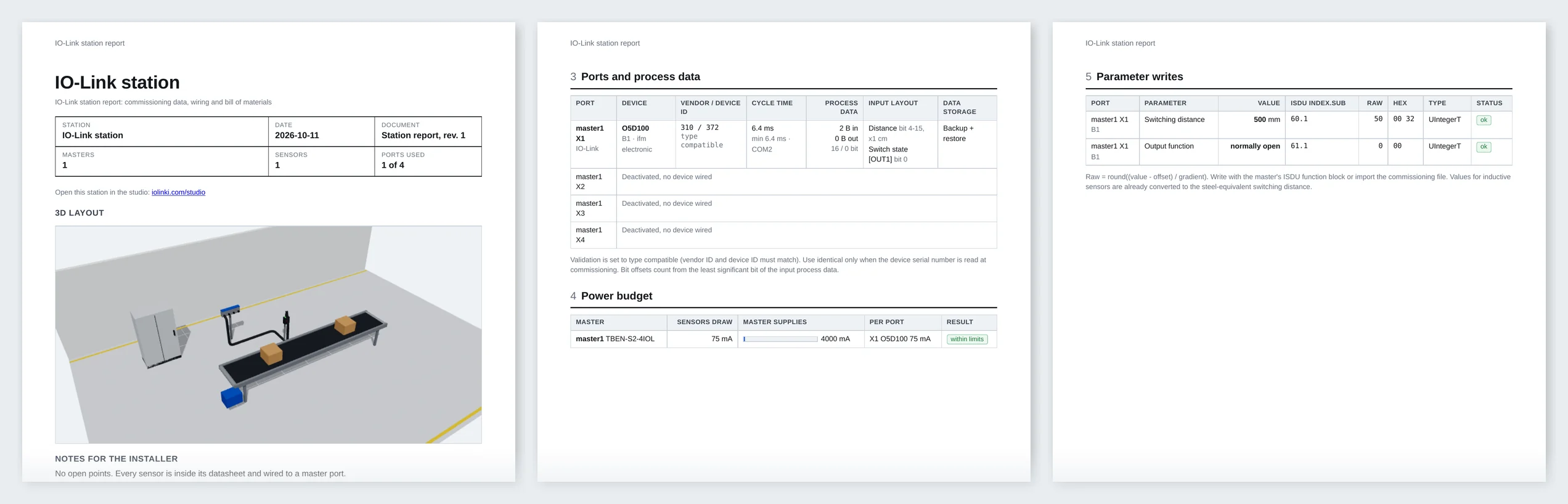
The screenshots show the earlier example. The JSON, CSV and current HTML report below use the current Studio data. They are proposed settings, not a record of physical commissioning.
The commissioning file has every port: validation IDs, cycle time, data storage, and each parameter as ISDU index, subindex and raw value. This is port X1 from the real file, trimmed to the fields that matter:
{
  "port": 1,
  "mode": "iolink",
  "tag": "B1",
  "device": {
    "part": "O5D100",
    "vendor": "ifm electronic",
    "vendor_id": 310,
    "device_id": 372,
    "iodd_file": "ifm-000174-20210526-IODD1.1.xml",
    "bitrate": "COM2",
    "validation": {
      "recommended": "type_compatible",
      "vendor_id": 310,
      "device_id": 372,
      "alternatives": [
        "none",
        "type_compatible",
        "identical"
      ],
      "serial_number": null
    },
    "data_storage": {
      "recommended": "backup_restore",
      "note": "Parameters are kept in the master so a replacement device is loaded automatically. Needs a device that supports data storage; check the IODD."
    },
    "cycle_time_ms": {
      "device_min": 6.4,
      "recommended": 6.4
    },
    "process_data": {
      "in_bits": 16,
      "in_bytes": 2,
      "out_bits": 0,
      "out_bytes": 0,
      "in_layout": [
        {
          "name": "Distance",
          "bit_offset": 4,
          "bits": 12,
          "gradient": 1,
          "unit": "cm"
        },
        {
          "name": "Switch state [OUT1]",
          "bit_offset": 0,
          "bits": 1,
          "gradient": null,
          "unit": null
        }
      ]
    },
    "parameters": [
      {
        "key": "switch_point",
        "name": "Switching distance",
        "kind": "setting",
        "unit": "mm",
        "value": 500,
        "entered": 500,
        "note": null,
        "index": 60,
        "subindex": 1,
        "datatype": "UIntegerT",
        "bit_length": 16,
        "raw": 50,
        "raw_hex": "00 32",
        "clamped": false,
        "status": "ok"
      },
      {
        "key": "output",
        "name": "Output function",
        "kind": "option",
        "unit": "",
        "value": "normally open",
        "entered": null,
        "note": null,
        "index": 61,
        "subindex": 1,
        "datatype": "UIntegerT",
        "bit_length": 8,
        "raw": 0,
        "raw_hex": "00",
        "clamped": false,
        "status": "ok"
      }
    ]
  }
}
Download: commissioning file (JSON) · CSV · current station report (HTML)
Buy and install. One button in the studio sends the station to us. We reply with a price and an install date, buy the parts, mount and wire them, and write the settings on site. No payment is taken in the studio.
Open this station in the studio
The same station comes out of ChatGPT with the iolinki connector (https://mcp.iolinki.com/mcp, setup on the MCP page): describe the job and it builds, checks and shows the station in the chat.